The pipeline: brief to final frame
Plan the film from the client’s request through to the finished video. Use clear review points so the client can approve the direction before you do the next stage.
Need a word explained? Open the glossary →
Full lesson & technical details
What “Hollywood-level” means in a 30-second piece, the six-checkpoint pipeline Astra follows, and how to brief an AI director so it does not improvise your film.
What the client is buying
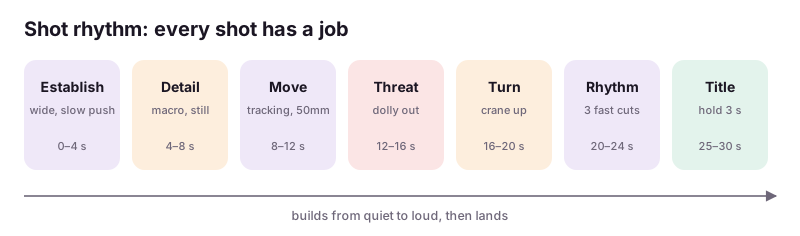
Not “3D animation.” They are buying the feeling of a trailer: deliberate camera, motivated light, a rhythm of shots that builds, and a final frame that lands. A 30-second teaser is usually 6–10 shots. Each shot has a job.
The six checkpoints
Astra works in stages and saves a Blender file at each. You review every checkpoint before it moves on. Nothing is lost when a stage goes wrong.
| Checkpoint | File | What is in it |
|---|---|---|
| 0 | scene_00_setup.blend | Units, frame rate 24, resolution 3840×2160, color management (AgX), collections named by shot |
| 1 | scene_01_assets.blend | Models imported, scaled to real units, materials checked, origins fixed |
| 2 | scene_02_layout.blend | Cameras per shot, blocking, shot list as text block in the file |
| 3 | scene_03_animation.blend | Keyframed camera and object motion, timing locked to the shot list |
| 4 | scene_04_lighting.blend | HDRI + key/fill/rim, volumetrics, depth of field, look-dev renders |
| 5 | scene_05_final.blend | Render settings, passes, compositor grade, output paths |
Briefing Astra as a director
Astra can drive Blender three ways: through the Blender MCP add-on (live, sees the scene), by writing bpy Python and running Blender headless (blender --background file.blend --python script.py), or by computer use (clicking the UI). The first two are precise and repeatable; computer use is for the few things that need the UI (installing add-ons, node-wrangler shortcuts, eyeballing a viewport).
A good brief to Astra has five parts: the reference (concept art, a trailer you both watch), the shot list, the asset list with paths, the technical spec (24fps, 4K, Cycles, 30s), and the checkpoint rule (“save and stop after each stage for my review”). Without the last part Astra will build the whole film in one go and you will hate a decision made in shot 2.
Where the time goes
Setup 10%, assets 30%, layout and animation 25%, lighting 20%, render and edit 15%. Clients think it is all render. Assets are where quality is won.
Worked example
| # | Sec | Shot | Camera | Job |
|---|---|---|---|---|
| 1 | 0–4 | Fog over ruined gate, lantern light inside | Slow push-in, 35mm | Establish place and mood |
| 2 | 4–7 | Lantern on a stone step, flame flicker | Static macro, 85mm, shallow DoF | Detail, texture, the object the game is named for |
| 3 | 7–11 | Hero walks through gate, back to camera | Tracking from behind, 50mm | Introduce character without showing face |
| 4 | 11–15 | Creature eyes open in the dark | Slow dolly out, 85mm | Threat |
| 5 | 15–20 | Hero raises lantern; light pours into hall | Crane up, 35mm | Turn: light vs dark |
| 6 | 20–25 | Three fast cuts: sword, claw, falling stone | Handheld shake 24mm | Rhythm, action |
| 7 | 25–30 | Logo forms from lantern embers | Static, 50mm | Title, date, hold |
Instructions you can copy (prompts)
Copy the instructions, replace the words inside {braces} with your details, and paste them into your AI tool. Check and edit the answer.
You are my Blender technical director. Project: a {length}-second cinematic for {client}. Reference: {reference description or file path}. Technical spec: Blender 5.x, 24 fps, 3840×2160, Cycles with GPU, AgX view transform, project folder {path}. We work in six checkpoints: scene_00_setup, 01_assets, 02_layout, 03_animation, 04_lighting, 05_final. After each checkpoint save the .blend with that name, render one 960×540 preview frame to previews/, and STOP for my review; do not proceed until I say “next”. Prefer the Blender MCP connection or bpy scripts over clicking the UI; use computer use only when the UI is required and tell me when you do. Start with checkpoint 0 now and show me the preview.
Watch one game or product trailer you admire and write its shot list: for each shot, the length in seconds, the camera move and the job it does. Paste the list below (6–10 shots).
Done when: A shot list you could hand to Astra, with a job for every shot.. Sign up to save your work to your account.
Quick knowledge check
3 questions, 60% passes. Checkpoints, the certification exam (three versions) and the reviewed final project are unlocked with a free account.
- Why does Astra save a .blend at every checkpoint?
- The most precise way for Astra to drive Blender is:
- Where does most of the quality come from in a short cinematic?