Audit the file and the question
Never edit the raw. Profile every column, list the problems, and ask the owner the three questions the report must answer before touching a cell.
Need a word explained? Open the glossary →
Full lesson & technical details
Never edit the raw. Profile every column, list the problems, and ask the owner the three questions the report must answer before touching a cell.
Raw is sacred
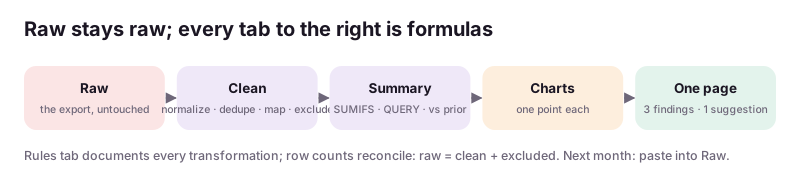
Paste the export into the Raw tab and never type in it. Everything happens in Clean via formulas or a documented copy-and-fix, so you can always prove what changed. Record the file name, source system and export date in Notes.
Column profile
For each column: what it holds, data type, blanks count, distinct values (UNIQUE), min/max for numbers and dates, obvious junk (trailing spaces, mixed case, “N/A”, currency symbols in numbers, dates as text). A ten-minute profile finds 80% of the problems.
Typical problems
Duplicate rows (same order ID twice from a re-export); dates in three formats; numbers stored as text; one “Name” column holding “First Last” and “Last, First”; a product column that was renamed mid-year; totals rows mixed into the data; merged cells; notes typed into number columns.
The three questions
Ask the owner: “What three questions should this report answer every month?” (sales by product, by month, by channel; top customers; expenses by category; stock below reorder). Those become the Summary tab. A report that answers questions nobody asked is decoration.
Scope
One sheet, under 2,000 rows, one source system per order unless quoted. Merging systems (Shopify plus Etsy) is the next tier and needs a shared key (order ID or date + SKU).
Worked example
- Order ID duplicated on 37 rows (re-export); rule: keep first by date. 2. Date column: 60% “2026-10-03”, 30% “10/3/2026”, 10% “Oct 3”; rule: parse all to real dates. 3. Total column has “$24.00” text; rule: VALUE after stripping symbols. 4. Product “Sea Salt & Cedar” also appears as “Sea Salt and Cedar ” (trailing space); rule: TRIM and a mapping table. 5. Four rows are subtotal lines; rule: exclude where Order ID blank. Questions: sales by product per month; sales by channel; repeat customers.
Instructions you can copy (prompts)
Copy the instructions, replace the words inside {braces} with your details, and paste them into your AI tool. Check and edit the answer.
Here are the headers and the first 40 rows of a {source} export: {paste sample}. Profile each column (type, likely meaning, blanks, junk patterns such as trailing spaces, mixed date formats, numbers as text, mixed case, totals rows). List every data problem you see with an example row, and propose the cleaning rule for each (a Sheets formula or a documented manual step). Then list the three questions a {business type} owner would most likely want this data to answer, and which columns each needs.
Profile the Wick & Willow export (or your own messy file), list the problems and the three questions, and confirm the questions with the “owner”. Paste the problem list and the questions.
Done when: A problem list with rules and three agreed questions, raw untouched.. Sign up to save your work to your account.
Quick knowledge check
3 questions, 60% passes. Checkpoints, the certification exam (three versions) and the reviewed final project are unlocked with a free account.
- The Raw tab is:
- Before cleaning you ask the owner:
- A column profile finds: