Platform, domain and consent
Set up the email tool and sending address, check permission to use the mailing list, and make signing up or leaving the list straightforward.
Need a word explained? Open the glossary →
Full lesson & technical details
Authenticate the sending domain, import the list the right way, add a signup form that says what people get, and set the unsubscribe and reply paths before any issue goes out.
Authenticate the domain (non-negotiable)
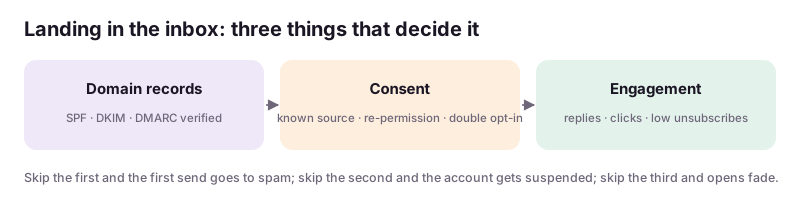
Emails from info@stillwateryoga.com land in inboxes only if the domain says the platform may send for it: SPF, DKIM and DMARC records in DNS. Every platform shows the three records to add; the client (or their web person) adds them in the domain’s DNS; you verify in the platform. Without this, the first send goes to spam and the list is poisoned. If the client has no domain email, use the platform’s default sender until they do.
Import the list honestly
Ask where every address came from: website form, in-store sign-up sheet, purchases, a conference badge scan five years ago. Import only addresses that opted in or bought; dormant addresses older than two years go through a re-permission email (“still want these?”) or are dropped. Mailchimp and Beehiiv will suspend an account whose first send bounces or gets spam complaints; a clean import avoids that.
The signup form
On the website and the Google Business Profile: one field (email), one sentence that says what and how often (“One short email on Fridays: class news, a tip, and member deals”), and a visible “no spam, unsubscribe any time”. Double opt-in on for quality. A QR code to the form at the front desk.
Reply and unsubscribe paths
Reply-to goes to the owner’s real inbox; replies are the best metric a newsletter has. Unsubscribe link in the footer with the physical address (required by law in the US). A “why are you leaving” one-click survey on the unsubscribe page gives you a free content audit.
Sender name
“Dana at Stillwater Yoga”, not “Stillwater Yoga Newsletter”. People open people.
Worked example
Mailchimp export: 1,100 contacts. Sources per the owner: 620 from the website form (keep), 310 from intro-offer sign-ups in the studio software (bought → keep), 170 from a 2021 workshop sign-up sheet (dormant → one re-permission email, drop non-responders after 7 days). Remove 23 bounces from the last send. Import 930 now, tagged by source; welcome sequence off for existing contacts; first issue to the 930 only.
Instructions you can copy (prompts)
Copy the instructions, replace the words inside {braces} with your details, and paste them into your AI tool. Check and edit the answer.
Write the setup checklist for a newsletter on {platform} for {business} with domain {domain}: the exact DNS records to request (SPF, DKIM, DMARC) phrased for a non-technical owner or their web person; how to export the list from {current source} and which addresses to import, re-permission, or drop; the signup form copy (one sentence on what and how often, one line on no spam); double opt-in setting; reply-to and footer address; sender name. Format as a checklist I can send the client with “you do” and “I do” columns.
Set up your practice publication: authenticate a domain you control (or note the records needed), build the signup form, and write the import plan for Stillwater Yoga’s 1,100-contact Mailchimp list. Paste the form copy and the import plan.
Done when: Domain verified (or records listed), form live with clear expectations, a consent-checked import plan.. Sign up to save your work to your account.
Quick knowledge check
3 questions, 60% passes. Checkpoints, the certification exam (three versions) and the reviewed final project are unlocked with a free account.
- Before the first send, the domain needs:
- A five-year-old conference badge scan list is:
- The best sender name is: